


ROCKET LEAGUEDoubles CircuitRanked 2v2 · 8 PM
✓
Turn tournaments intosomething bigger.
Build an ongoing competitive program with scheduled starts, multiple active events, skill-based team balancing, player rankings, verification, and community branding.
Premium feature
View Premium options
What Premium unlocks
Give your tournament program room to grow.
Keep several competitions moving, schedule event launches, and give players lasting reasons to return through ranks, leaderboards, and community customization.
01 · AUTOMATE EVENT DAY
Schedule it once. Let ATOM start it.
Choose when registration opens and when competition begins. At the scheduled time, ATOM checks that enough teams are ready and starts the tournament automatically.
Automatic starts support Random Teams in Single Round, Single Elimination, Double Elimination, and Round Robin. Groups into Playoffs starts manually, with staff review before playoffs.
- Scheduled registration windowChoose when registration opens and closes so players can join at the right time.
- Automatic tournament startLaunch the tournament on schedule without requiring a staff member to be present.
- Minimum-team safeguardATOM confirms enough teams are ready before the tournament begins.
AUTOMATED EVENT PLANNext scheduled launch✓ Scheduled
 ROCKET LEAGUE · 3V3Saturday ShowdownSaturday, October 17 · 8:00 PMStarts with 6+ teams
1THURSDAY · 6:00 PMRegistration opens automaticallyPlayers can join from Discord or BGL
2SATURDAY · 7:55 PMTeam requirement is checkedATOM confirms at least six teams are ready
3SATURDAY · 8:00 PMCompetition starts automaticallyTeams, bracket, and match spaces are created
✓EVENT-DAY RESULTScheduled once. Handled automatically.No manual start needed
02 · RANK
Build competition around skill.
Define your own MMR ranges and rank tiers, balance teams using player ratings, and keep matching Discord roles synchronized as players move.
RANK MANAGEMENT184 demo players
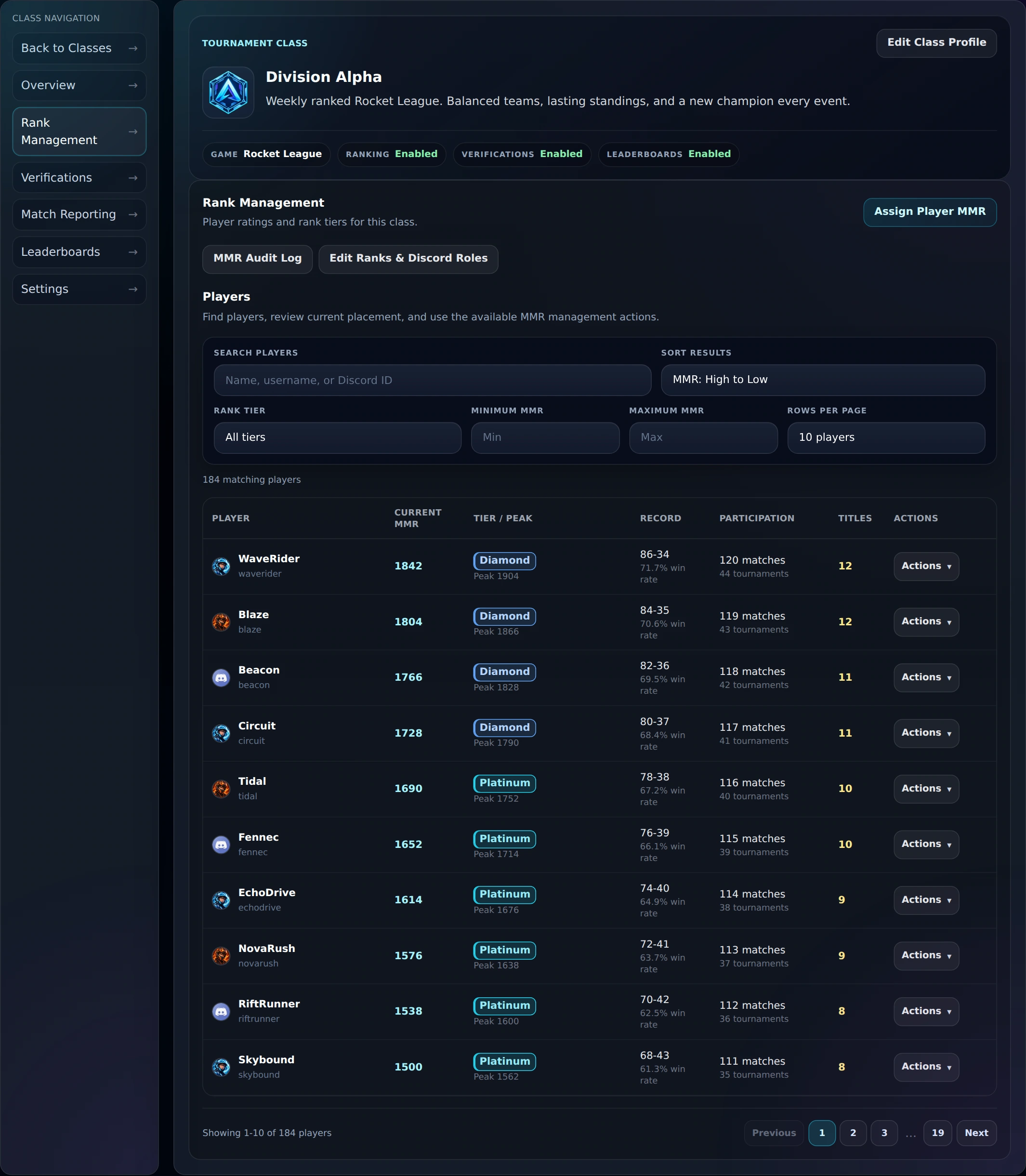
 PLAYER UPDATEWaveRider+29 MMR
 BEFOREDiamond III1,795 MMR
 NEW RANKChampion I1,824 MMR
Discord role updatedChampion I assigned automatically
03 · LEADERBOARDS
Give players something to climb.
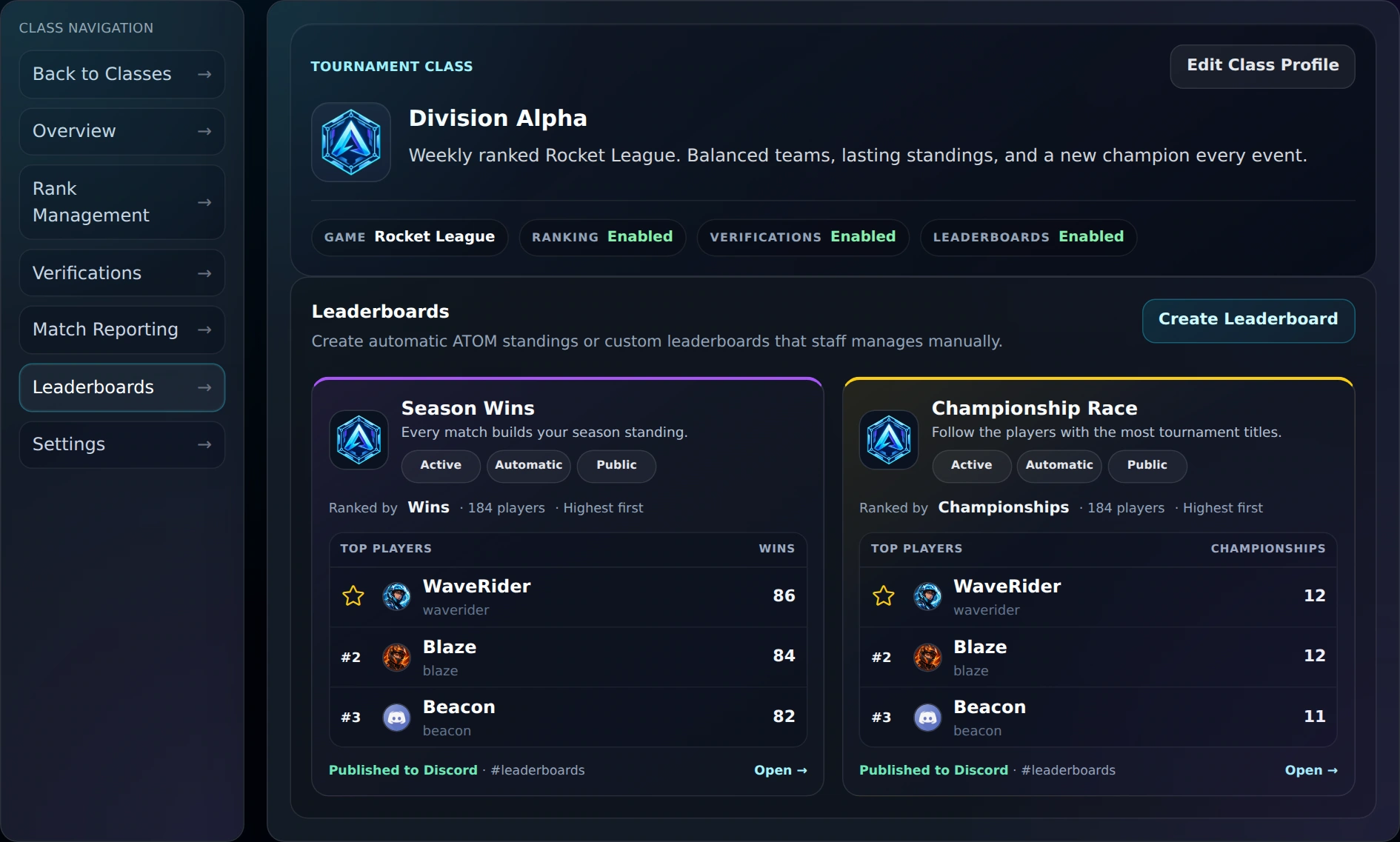
Rank the statistics that matter to your community, publish customized Discord embeds, and give participants a dedicated leaderboard page to follow.
LEADERBOARD SYSTEMOne statistic · two live destinations

ATOM ✓ APP# leaderboards
 DIVISION ALPHASeason Wins
⭐@WaveRider86
#2@Blaze84
#3@Beacon82
Updated automatically after the tournament
04 · VERIFY
Verify every participant.
Build the application your rules require, review answers and uploads, then approve eligible players with or without assigning an initial MMR.
APPLICATION REVIEW1 awaiting decision
✓Submitted2Staff review3Approved
 SUBMITTED BYBlazeRequested MMR: 1,804
In review
ROCKET LEAGUE TRACKER PROFILErocketleague.tracker.network/blaze
Open response ↗
05 · REPORT
Validate every result.
Collect more than a winner. Ask for game scores, statistics, replay links, files, and supporting evidence in one structured match report.
MATCH REPORT · ROUND 3Result ready for reviewSubmitted
 Neon Harbor
FINAL3 : 1
 Ember Circuit
Game scores2-1 · 3-2 · 1-0 · 4-1
Replay link✓ Received
Evidence upload✓ 2 files
Custom question · Series MVPWaveRider
✓All required fields receivedReady for organizer review
06 · BRAND
Make every surface feel like your community.
Add class thumbnails and banners, then carry that identity into registration, tournaments, leaderboards, and the Discord embeds your players see.
DISCORD MESSAGE APPEARANCEClass Settings
Customize each Discord message typeChoose its accent color and which thumbnail ATOM displays.Saved automatically
RegistrationSign-up announcementsColor:#FACC15Class image⌄
Class image⌄MatchesMatchup messagesColor:#A855F7Custom image⌄
Custom image⌄ResultsRound outcomesColor:#22D3EEClass image⌄
Class image⌄Tournament WinnersChampion announcementsColor:#FACC15Custom image⌄
Custom image⌄LIVE DISCORD PREVIEWRegistration
Preview updates with the selected color and image.
ATOM Free vs. ATOM Premium
Keep the complete tournament engine. Add what your community needs next.
Free remains a complete way to run tournaments. Premium expands how many competitions you can operate and what can continue between them.
| Capability | ATOM FreeRun tournaments | ATOM PremiumBuild a tournament program |
|---|---|---|
| Tournament formatsCustomizable formats for tournaments and leagues. Explore the formats. | ✓ All supported formats | ✓ All supported formats |
| Group standings and playoffsTeam results, qualification, and progression within an event | ✓ Included with the selected format | ✓ Included with the selected format |
| Active tournamentsEvents your server can operate at the same time | 1 active tournament | ✓ Multiple active tournaments |
| Active classesIndependent competition setups for games or groups | 1 active class | ✓ Multiple active classes |
| Registration and startsHow your staff launches each event | Open and start manually | ✓ Schedule registration and automatic tournament starts |
| Match reportingInformation collected with a submitted result | Standard tournament results | ✓ Custom questions, statistics, links, and file evidence |
| Tournament historyCompleted events preserved for later review | ✓ Stored and viewable in the Tournament Hub | ✓ Stored and viewable in the Tournament Hub |
| Ranked progressionPlayer skill and recognition between events | Not included | ✓ MMR, rank tiers, rating history, and Discord rank roles |
| Player verificationReview eligibility before players compete | Not included | ✓ Custom forms, uploads, review, approval, and optional initial MMR |
| Across-event leaderboardsPlayer statistics across tournaments, separate from event group standings | Not included | ✓ Automatic or staff-managed standings on Discord and BGL |
| Class presentationHow competitions appear across ATOM | Not included | ✓ Custom class and tournament imagery |
| CSV exportsDownload access for the features you manage | Members and Free feature exports | ✓ Free exports plus Premium feature exports |
On smaller screens, swipe the comparison to see both plans.
One server. The complete Premium experience.
Give your community more room to compete.
Upgrade the Discord server that needs more capacity, scheduled automation, ranked progression, verification, leaderboards, and deeper customization.
Everything in ATOM Free
Every Premium capability shown above
Premium access for eligible server administrators
Not ready for Premium? Keep using the complete core tournament engine with ATOM Free.
Premium questions
Before you upgrade.
Is Premium purchased per user or per server?
Premium applies to one Discord server. Its authorized ATOM admins share access to the Premium tools, and players do not need individual subscriptions. Each additional server needs its own Premium access.
Can I run multiple tournaments at the same time?
Yes. Premium lets your server run multiple active tournaments and use separate classes for different games or groups. Each class has its own settings, rankings, and player verification.
Can every tournament start automatically?
Automatic starts support Random Teams in Single Round, Single Elimination, Double Elimination, and Round Robin. Other team modes and Groups into Playoffs require a manual start. ATOM checks that enough teams are ready before starting automatically.
Can I use player verification without player rankings?
Yes. Verification and rankings can be used separately. You can review player applications without assigning skill ratings, or combine both when you want verified players and ranked competition.
Can I try Premium before subscribing?
Eligible servers can activate a one-time, 30-day Premium trial from My Subscriptions. No payment method is required, and the trial does not renew or charge automatically.
How do I activate Premium for my server?
Open My Subscriptions, find a server you administer, and choose its available trial or subscription option. Follow the activation or checkout steps, then check that the server shows Premium as active.
How do I cancel my subscription?
Open My Subscriptions to find the billing management options for your server. For Discord purchases, use the purchasing Discord account to manage the subscription. For other purchases, use the payment platform on your receipt. Removing ATOM alone may not stop recurring billing.
What happens when Premium access ends?
Premium tools become restricted when access ends. Saved Premium settings can be used again when you reactivate Premium for the same server. You can check your server’s access status and dates in My Subscriptions.
Before activating an offer or purchasing: review the Terms & Conditions, Privacy Policy, and Refund & Cancellation Policy. Offer details control eligibility, duration, included features, and the account or server receiving access. Before paying, review the price, tax, access term, renewal schedule, and payment-platform terms shown at checkout.